

How Lens works
Broadcast teams managing hundreds or thousands of channels don’t have time to cross-reference alerts across separate systems. Lens replaces that process with a single interface. Color-coded severity indicators appear at every level of the hierarchy, so you can see at a glance whether a problem affects one feed or an entire region. Sources can belong to multiple groups at once, the same feed grouped by provider and by signal path, so your team can investigate from whatever angle is most useful. Drill down, trace the root cause, filter by criticality. Done.
Faster MTTR reduces operational costs
Every minute of unresolved downtime has a cost, in lost ad revenue, missed SLAs, subscriber churn and more. The faster your team finds root cause, the less that clock runs. By consolidating alarm data and system relationships into a single view, Lens directly reduces MTTR. This means fewer minutes of downtime per incident and lower operational costs. For operations teams under pressure to do more with the same headcount, that’s a must.
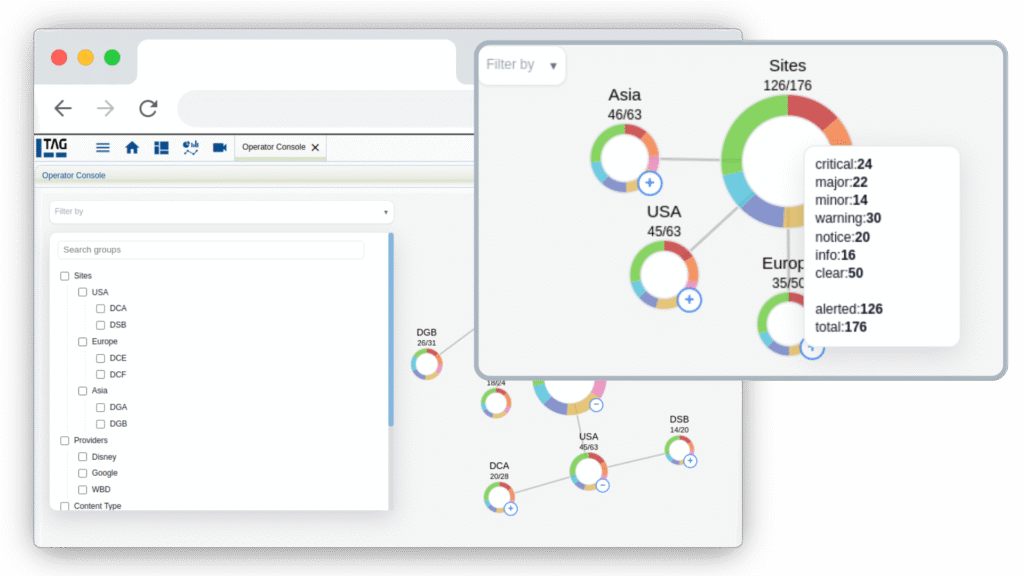
Lens is TAG's visual operations dashboard, designed to cut the time it takes to identify and resolve broadcast service failures. When alarms go off across hundreds or thousands of sources simultaneously, Lens lets your team see exactly where problems are concentrated, and drill down to root cause, without switching between tools or manually correlating alerts.
At the group level, Lens shows alarm distribution by severity relative to total sources in that group, so your team can immediately distinguish a systemic failure from an isolated issue. At the source level, each source is color-coded by its most severe active alarm. Combined with drill-down navigation, path tracing, and in-context highlighting, operators can move from "something's wrong" to root cause in seconds, without leaving the interface.
Yes, and this is one of Lens's core advantages. A single source can belong to multiple parent groups simultaneously, for example, grouped by both provider (Sports Entertainment) and resolution (1080p), so engineers can investigate an incident from whatever angle is most relevant without duplicating configuration or maintaining parallel systems.
Lens is fully interactive. Users can expand and collapse group hierarchies, highlight a source and trace its connections back through parent groups, apply severity filters to focus only on critical or major alarms, search and filter by group name, and open detailed source views, all within a single interface. It's built for real-time troubleshooting under pressure, not just monitoring.
Lens is ideal for large scale deployments. The more sources you're managing, the harder it becomes to know where to look when something breaks, and that's exactly what Lens solves. By organizing hundreds or thousands of sources into your own custom hierarchy, Lens makes sure that when an alarm blares, you're not searching through a flat list, you're navigating a structure that already reflects how your operation works. The grouping is key: it's what turns a wall of alerts into a clear answer.